 下載 iOS 版
 下載 Android APK




需要幫助?
xiaoqiang.dong@gmail.com
需要幫助?從這裡開始。
在支援頁面查閱同步、FIT 匯入、靜態與動態海報範本、編輯及匯出的說明。


在 iPhone 和 iPad 上體驗虛擬騎行,將運動記錄製作成海報;也可將 Garmin、邁金中國、高馳、跡馳的活動或 FIT 檔案同步至 Strava。

為 iOS 和 Android 打造原生應用程式。已適配 iPhone、iPhone Duo 與 iPad,介面佈局隨螢幕尺寸和直橫向切換調整。
連接相容的訓練台,重溫儲存在 Strava 中的真實騎行路線與賽段。在熟悉的風景中,與曾經的自己並肩前行,也向狀態最好的自己發起挑戰。
每個在哇橋綁定的 Strava 帳號享有 7 天免費、不限次數的虛擬騎行。
查看哇橋虛擬騎行使用指南將自己騎過的路線帶入室內,選擇以歷史騎行紀錄或個人最佳表現為參照的虛擬陪騎,讓每一次出發都有陪伴與目標。
結合實際地形與三維場景,模擬沿途的地貌、環境與景色,讓起伏與遠景伴隨每一次踩踏徐徐展開。
完成後,可將運動紀錄以「虛擬騎行」類型上傳至 Strava,延續你的運動歷程。
適配 iPhone、iPad 與 iPhone Duo,隨螢幕尺寸及直橫向切換調整佈局,讓騎行畫面與運動數據清晰呈現。
選擇 Strava 活動和範本,製作屬於自己的海報。
靜態與動態海報可在 iOS 使用。Android 目前提供運動同步功能。
探索海報功能 →
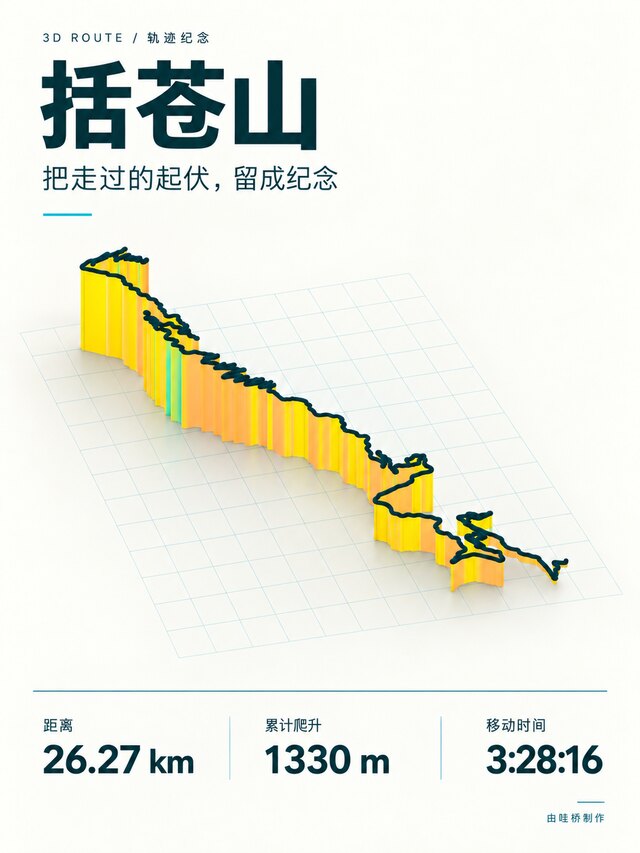
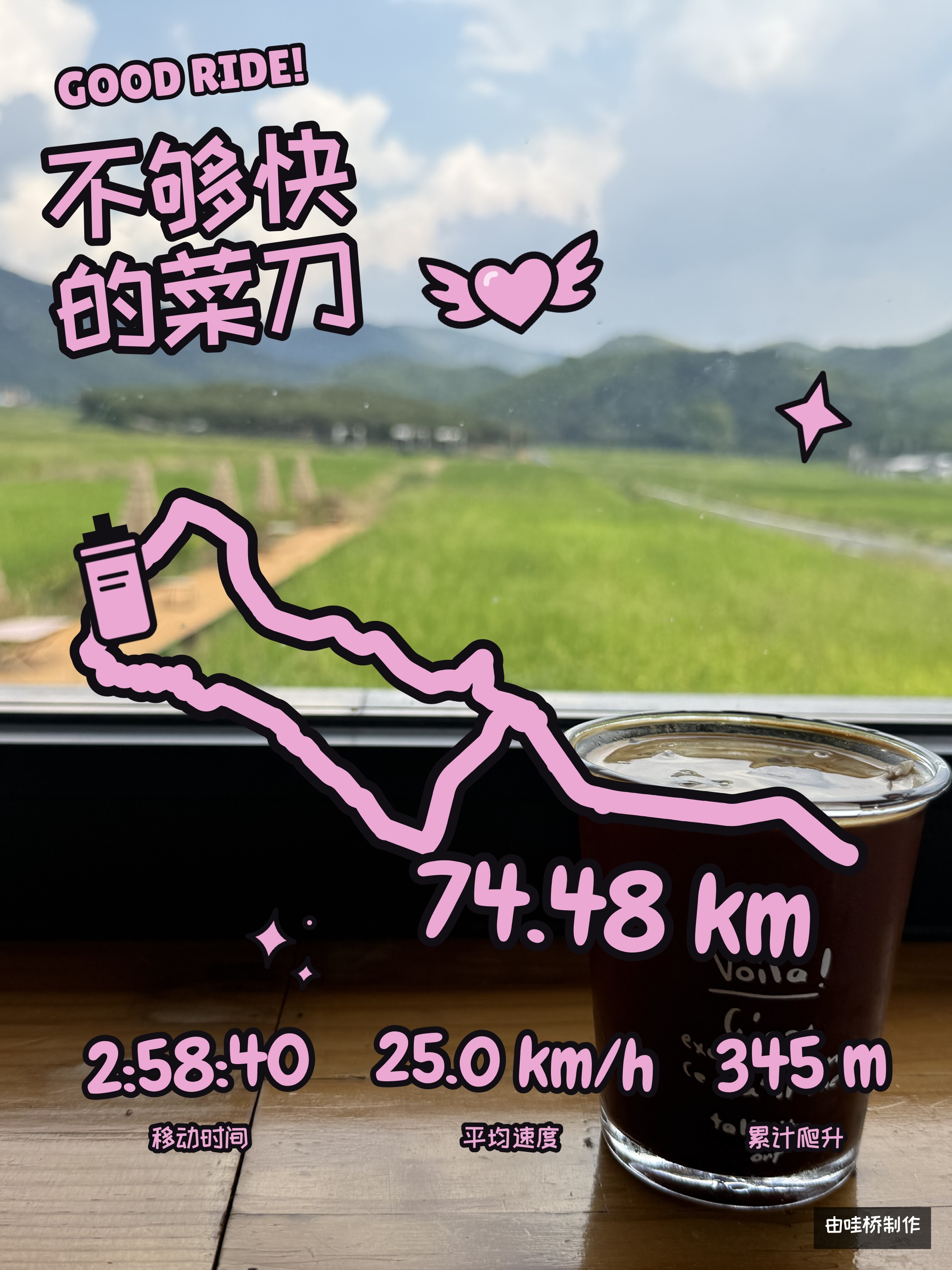
選擇 Strava 活動,以 3D 探索路線、加入沿途照片,或在自己的影片上疊加運動數據。每種範本都以不同方式講述你的故事。
沿著 3D 地形追隨路線,重溫爬升與下坡。
將喜愛的照片與運動數據結合,製作充滿趣味的紀念影片。
以自己的影片為背景播放,同時呈現軌跡與運動數據。
同步功能主要為中國大陸部分無法直接同步至 Strava 的運動資料來源提供支援,也支援匯入 FIT 檔案。海報製作直接使用 Strava 活動,無須使用此同步功能。
在支援頁面查閱同步、FIT 匯入、靜態與動態海報範本、編輯及匯出的說明。
Roulez virtuellement sur iPhone et iPad et transformez vos activités en affiches. Synchronisez vos activités Garmin, Magene Chine, COROS, iGPSPORT ou vos fichiers FIT avec Strava.
Des applications natives pour iOS et Android. Adaptées à l’iPhone, à l’iPhone Duo et à l’iPad, avec une interface qui s’ajuste à la taille et à l’orientation de l’écran.
Connectez un home trainer compatible et revivez les parcours et segments que vous avez réellement parcourus et enregistrés dans Strava. Retrouvez des paysages familiers, roulez aux côtés de votre ancien vous ou mesurez-vous à votre meilleure performance.
Chaque compte Strava lié dans VaBridge bénéficie de 7 jours de cyclisme virtuel gratuits, sans limite de sorties.
Consulter le guide du cyclisme virtuel de VaBridgeRetrouvez en intérieur les itinéraires que vous avez déjà parcourus. Choisissez un compagnon virtuel basé sur une sortie passée ou votre meilleure performance personnelle, pour donner à chaque départ une présence et un objectif.
Le relief réel et les scènes en 3D se combinent pour simuler le terrain, l’environnement et les paysages du parcours. Au fil des coups de pédale, les dénivelés et les horizons se dévoilent.
Une fois la sortie terminée, vous pouvez l’envoyer sur Strava en tant qu’activité de « vélo virtuel » et poursuivre votre histoire sportive.
Adapté à l’iPhone, à l’iPad et à l’iPhone Duo, avec une interface qui s’ajuste à la taille de l’écran et à son orientation, pour garder la scène et les données de votre sortie bien lisibles.
Choisissez une activité Strava et un modèle, puis créez une affiche qui vous ressemble.
Les affiches fixes et animées sont disponibles sur iOS. Android propose actuellement la synchronisation d’activités.
Découvrir les affiches →Choisissez une activité Strava. Explorez son parcours en 3D, ajoutez des photos de votre sortie ou superposez vos statistiques à vos propres vidéos. Chaque modèle raconte votre histoire à sa façon.
Suivez votre parcours sur un relief en 3D et revivez les montées et les descentes.
Réunissez vos photos préférées et vos statistiques dans un souvenir vidéo plein de fantaisie.
Gardez votre parcours et vos statistiques à l’écran pendant que votre vidéo défile en arrière-plan.
La synchronisation s’adresse principalement aux sources d’activités de Chine continentale qui ne peuvent pas se synchroniser directement avec Strava. Vous pouvez aussi importer des fichiers FIT. La création d’affiches utilise directement vos activités Strava et ne nécessite pas cette fonction de synchronisation.
Retrouvez l’aide sur la synchronisation, l’importation FIT, les modèles d’affiches fixes et animées, la retouche et l’exportation sur notre page d’assistance.
Fahre virtuell auf iPhone und iPad und gestalte Poster aus deinen Aktivitäten. Synchronisiere Garmin-, Magene-China-, COROS- und iGPSPORT-Aktivitäten oder FIT-Dateien mit Strava.
Native Apps für iOS und Android. Für iPhone, iPhone Duo und iPad optimiert, mit Layouts, die sich an Bildschirmgröße und Ausrichtung anpassen.
Verbinde einen kompatiblen Indoor-Trainer und erlebe deine tatsächlich gefahrenen, in Strava gespeicherten Strecken und Segmente erneut. Fahre durch vertraute Landschaften an der Seite deines früheren Ichs – oder stelle dich deiner persönlichen Bestleistung.
Jedes in VaBridge verknüpfte Strava-Konto erhält 7 Tage kostenloses virtuelles Radfahren – mit unbegrenzt vielen Fahrten.
Anleitung zum virtuellen Radfahren mit VaBridge ansehenBringe bereits gefahrene Strecken nach drinnen. Wähle eine virtuelle Begleitung auf Grundlage einer früheren Fahrt oder deiner persönlichen Bestleistung und starte jede Fahrt mit Begleitung und einem Ziel.
Reale Geländedaten und 3D-Szenen bilden Gelände, Umgebung und Landschaft entlang der Strecke nach. Mit jedem Pedaltritt entfalten sich Höhenzüge und weite Ausblicke.
Nach deiner Fahrt kannst du die Aufzeichnung als „Virtuelle Radfahrt“ zu Strava hochladen und deine sportliche Geschichte fortschreiben.
Für iPhone, iPad und iPhone Duo optimiert. Das Layout passt sich an Bildschirmgröße sowie Hoch- und Querformat an, damit Fahransicht und Trainingsdaten übersichtlich bleiben.
Wähle eine Strava-Aktivität und eine Vorlage und gestalte ein Poster, das zu dir passt.
Statische und animierte Poster sind unter iOS verfügbar. Android bietet derzeit die Synchronisierung von Aktivitäten.
Posterfunktionen entdecken →Wähle eine Strava-Aktivität. Entdecke ihre Route in 3D, füge Fotos von unterwegs hinzu oder lege deine Trainingsdaten über eigene Videos. Jede Vorlage erzählt deine Geschichte auf ihre Weise.
Folge deiner Route durch 3D-Gelände und erlebe Aufstiege und Abfahrten erneut.
Vereine Lieblingsfotos und Trainingsdaten zu einer verspielten Videoerinnerung.
Behalte Route und Trainingsdaten im Blick, während dein eigenes Video im Hintergrund läuft.
Die Synchronisierung ist vor allem für Aktivitätsquellen in Festlandchina gedacht, die nicht direkt mit Strava synchronisieren können. Du kannst auch FIT-Dateien importieren. Für die Postererstellung werden deine Strava-Aktivitäten direkt verwendet; diese Synchronisierungsfunktion ist dafür nicht erforderlich.
Auf unserer Hilfeseite findest du Informationen zu Synchronisierung, FIT-Import, statischen und animierten Postervorlagen, Bearbeitung und Export.
Practica ciclismo virtual en iPhone y iPad y convierte tus actividades en pósteres. Sincroniza actividades de Garmin, Magene China, COROS, iGPSPORT o archivos FIT con Strava.
Apps nativas para iOS y Android. Adaptadas a iPhone, iPhone Duo y iPad, con diseños que se ajustan al tamaño y la orientación de la pantalla.
Conecta un rodillo compatible y revive las rutas y los segmentos reales que has recorrido y guardado en Strava. Vuelve a paisajes conocidos, pedalea junto a tu yo del pasado o desafía tu mejor versión.
Cada cuenta de Strava vinculada en VaBridge disfruta de 7 días de ciclismo virtual gratis, sin límite de sesiones.
Ver la guía de ciclismo virtual de VaBridgeLleva al interior las rutas que ya has recorrido. Elige un acompañante virtual basado en una actividad anterior o en tu mejor rendimiento personal, para que cada salida tenga compañía y un objetivo.
El relieve real y las escenas en 3D se combinan para recrear el terreno, el entorno y los paisajes de la ruta. Con cada pedalada, los desniveles y las vistas lejanas se despliegan ante ti.
Al terminar, puedes subir el registro a Strava como una actividad de «ciclismo virtual» y seguir construyendo tu historia deportiva.
Adaptado a iPhone, iPad y iPhone Duo. El diseño se ajusta al tamaño de la pantalla y a la orientación vertical u horizontal para mostrar con claridad el recorrido y los datos de tu actividad.
Elige una actividad de Strava y una plantilla, y crea un póster que refleje tu estilo.
Los pósteres estáticos y animados están disponibles en iOS. Android ofrece actualmente sincronización de actividades.
Descubre las funciones de pósteres →Elige una actividad de Strava. Explora su ruta en 3D, añade fotos del recorrido o superpón tus estadísticas a tus propios vídeos. Cada plantilla cuenta tu historia de una forma diferente.
Sigue tu ruta por un terreno en 3D y revive las subidas y bajadas.
Combina tus fotos favoritas y estadísticas en un recuerdo en vídeo lleno de alegría.
Mantén tu ruta y tus estadísticas a la vista mientras tu propio vídeo se reproduce de fondo.
La sincronización está pensada principalmente para fuentes de actividades de China continental que no pueden sincronizarse directamente con Strava. También puedes importar archivos FIT. La creación de pósteres utiliza directamente tus actividades de Strava y no requiere esta función de sincronización.
Consulta nuestra página de ayuda para obtener información sobre sincronización, importación FIT, plantillas de pósteres estáticos y animados, edición y exportación.
Pedala virtualmente su iPhone e iPad e trasforma le tue attività in poster. Sincronizza attività Garmin, Magene Cina, COROS, iGPSPORT o file FIT con Strava.
App native per iOS e Android. Ottimizzate per iPhone, iPhone Duo e iPad, con layout che si adattano alle dimensioni e all’orientamento dello schermo.
Collega un rullo compatibile e rivivi i percorsi e i segmenti reali che hai pedalato e salvato su Strava. Ritrova paesaggi familiari, pedala accanto al tuo io di ieri oppure mettiti alla prova contro la tua migliore prestazione.
Ogni account Strava collegato in VaBridge offre 7 giorni di ciclismo virtuale gratuito, senza limiti di sessioni.
Consulta la guida al ciclismo virtuale di VaBridgePorta al chiuso i percorsi che hai già affrontato. Scegli un compagno virtuale basato su un’uscita passata o sulla tua migliore prestazione personale, per dare a ogni partenza una compagnia e un obiettivo.
Il rilievo reale e gli scenari in 3D si uniscono per simulare il terreno, l’ambiente e i paesaggi lungo il percorso. A ogni pedalata, dislivelli e panorami si aprono davanti a te.
Al termine, puoi caricare la registrazione su Strava come attività di «ciclismo virtuale» e continuare a raccontare il tuo percorso sportivo.
Ottimizzato per iPhone, iPad e iPhone Duo. Il layout si adatta alle dimensioni dello schermo e all’orientamento verticale o orizzontale, mantenendo sempre chiari la scena e i dati della pedalata.
Scegli un’attività Strava e un modello, poi crea un poster che ti rappresenti.
I poster statici e animati sono disponibili su iOS. Android offre attualmente la sincronizzazione delle attività.
Scopri le funzioni dei poster →Scegli un’attività Strava. Esplora il percorso in 3D, aggiungi foto del viaggio o sovrapponi le statistiche ai tuoi video. Ogni modello racconta la tua storia in modo diverso.
Segui il percorso su un terreno in 3D e rivivi salite e discese.
Riunisci le foto preferite e le statistiche in un ricordo video giocoso.
Mantieni il percorso e le statistiche in vista mentre il tuo video scorre sullo sfondo.
La sincronizzazione è pensata principalmente per le fonti di attività della Cina continentale che non possono sincronizzarsi direttamente con Strava. Puoi anche importare file FIT. La creazione di poster usa direttamente le tue attività Strava e non richiede questa funzione di sincronizzazione.
Nella pagina di assistenza trovi informazioni su sincronizzazione, importazione FIT, modelli di poster statici e animati, modifica ed esportazione.
iPhoneとiPadでバーチャルライドを楽しみ、アクティビティをポスターに。Garmin、Magene中国、COROS、iGPSPORTのアクティビティやFITファイルをStravaに同期できます。
iOS と Android 向けのネイティブアプリ。iPhone、iPhone Duo、iPad に対応し、画面サイズや縦向き・横向きに合わせてレイアウトが調整されます。
対応するインドアトレーナーを接続して、Strava に保存した実際の走行ルートやセグメントをもう一度。見慣れた景色の中で、過去の自分と並走したり、ベストを出した自分に挑んだりできます。
VaBridgeで連携した Strava アカウントごとに、7 日間無料でバーチャルライドを回数制限なく楽しめます。
VaBridgeのバーチャルライド利用ガイドを見る自分が走ったルートを室内で再体験。過去の走行記録や自己ベストをもとにしたバーチャルパートナーを選び、仲間と目標のあるライドを楽しめます。
実際の地形と 3D シーンを組み合わせ、ルート周辺の地形や環境、風景を再現。ペダルを踏むたびに、起伏のある道と遠くの景色が目の前に広がります。
終了後は、アクティビティを「バーチャルライド」として Strava にアップロードし、日々の運動記録につなげられます。
iPhone、iPad、iPhone Duo に対応。画面サイズや縦向き・横向きに合わせてレイアウトが調整され、ライド画面と運動データを見やすく表示します。
Strava のアクティビティとテンプレートを選び、自分らしいポスターを作りましょう。
静止画・動画ポスターは iOS で利用できます。Android 版は現在、アクティビティの同期に対応しています。
ポスター機能を見る →Strava のアクティビティを選択。ルートを 3D でたどったり、道中の写真を加えたり、自分の映像に運動データを重ねたりできます。テンプレートごとに異なる形で体験を伝えられます。
3D の地形に沿ってルートをたどり、登りと下りをもう一度体験しましょう。
お気に入りの写真と運動データを集めて、遊び心のある思い出の動画に。
自分の映像を背景に再生しながら、ルートと運動データを表示します。
同期機能は、主に Strava に直接同期できない中国本土の一部の運動データサービス向けです。FIT ファイルの読み込みにも対応しています。ポスター作成には Strava のアクティビティを直接使用するため、この同期機能を利用する必要はありません。
同期、FIT 読み込み、静止画・動画ポスターのテンプレート、編集、書き出しについてはサポートページをご覧ください。
iPhone과 iPad에서 가상 라이딩을 즐기고 활동을 포스터로 만드세요. Garmin, Magene 중국, COROS, iGPSPORT 활동이나 FIT 파일을 Strava에 동기화할 수도 있습니다.
iOS와 Android를 위한 네이티브 앱입니다. iPhone, iPhone Duo, iPad에 최적화되어 화면 크기와 가로·세로 방향에 맞게 레이아웃이 조정됩니다.
호환되는 실내 트레이너를 연결하고 Strava에 저장된 실제 라이딩 경로와 구간을 다시 달려 보세요. 익숙한 풍경 속에서 과거의 자신과 나란히 달리거나, 최고의 기록을 세운 자신에게 도전할 수 있습니다.
VaBridge에 연결한 각 Strava 계정은 7일 동안 횟수 제한 없이 가상 라이딩을 무료로 이용할 수 있습니다.
VaBridge 가상 라이딩 사용 가이드 보기직접 달렸던 경로를 실내에서 다시 경험하세요. 과거 라이딩 기록이나 개인 최고 기록을 바탕으로 한 가상 동반자를 선택해, 함께 달리는 즐거움과 목표가 있는 라이딩을 이어 갈 수 있습니다.
실제 지형과 3D 장면을 결합해 경로 주변의 지형, 환경과 풍경을 재현합니다. 페달을 밟을 때마다 오르내리는 길과 먼 풍경이 눈앞에 펼쳐집니다.
라이딩을 마친 뒤에는 운동 기록을 Strava에 ‘가상 라이딩’ 유형으로 업로드해 나만의 운동 여정을 이어 갈 수 있습니다.
iPhone, iPad, iPhone Duo에 최적화되어 있습니다. 화면 크기와 가로·세로 방향에 맞게 레이아웃이 조정되어 라이딩 화면과 운동 데이터를 선명하게 보여 줍니다.
Strava 활동과 템플릿을 선택해 나다운 포스터를 만들어 보세요.
정적 포스터와 동영상 포스터는 iOS에서 사용할 수 있습니다. Android는 현재 활동 동기화를 제공합니다.
포스터 기능 살펴보기 →Strava 활동을 선택하세요. 경로를 3D로 살펴보거나 여행 사진을 추가하고, 직접 촬영한 영상에 운동 데이터를 겹칠 수 있습니다. 템플릿마다 다른 방식으로 이야기를 전합니다.
3D 지형 위에서 경로를 따라가며 오르막과 내리막을 다시 경험하세요.
좋아하는 사진과 운동 데이터를 모아 즐거운 추억의 동영상으로 만드세요.
직접 촬영한 영상을 배경으로 재생하면서 경로와 운동 데이터를 표시하세요.
동기화 기능은 주로 Strava에 직접 동기화할 수 없는 중국 본토의 일부 운동 데이터 서비스를 위한 기능입니다. FIT 파일도 가져올 수 있습니다. 포스터는 Strava 활동을 직접 사용해 제작하므로 이 동기화 기능을 사용할 필요가 없습니다.
동기화, FIT 가져오기, 정적·동영상 포스터 템플릿, 편집 및 내보내기는 지원 페이지에서 확인하세요.
Kør virtuelt på iPhone og iPad, og lav plakater af dine aktiviteter. Synkroniser aktiviteter fra Garmin, Magene Kina, COROS, iGPSPORT eller FIT-filer til Strava.
Native apps til iOS og Android. Tilpasset iPhone, iPhone Duo og iPad med layout, der tilpasser sig skærmens størrelse og retning.
Tilslut en kompatibel hometrainer, og genoplev de ruter og segmenter, du har kørt og gemt i Strava. Kør gennem velkendte landskaber sammen med dit tidligere jeg, eller udfordr dig selv, da du var allerbedst.
Hver Strava-konto, der er tilknyttet i VaBridge, får 7 dages gratis virtuel cykling med ubegrænset antal ture.
Se guiden til virtuel cykling med VaBridgeTag dine tidligere ruter med indendørs. Vælg en virtuel ledsager baseret på en tidligere tur eller din personlige bedste præstation, så hver tur har både selskab og et mål.
Virkelige terrændata og 3D-scener simulerer landskabet og omgivelserne langs ruten. Bakker og fjerne udsigter folder sig ud, mens du træder i pedalerne.
Når turen er slut, kan du uploade den til Strava som en virtuel cykeltur og fortsætte din træningshistorik.
Tilpasset iPhone, iPad og iPhone Duo. Layoutet følger skærmens størrelse og skifter mellem stående og liggende visning, så både cykelscenen og dine træningsdata står tydeligt.
Vælg en Strava-aktivitet og en skabelon, og lav en personlig plakat.
Statiske plakater og videoplakater er tilgængelige på iOS. Android tilbyder i øjeblikket aktivitetssynkronisering.
Udforsk plakatfunktioner →Vælg en Strava-aktivitet. Udforsk ruten i 3D, tilføj billeder fra turen, eller læg dine aktivitetsdata oven på dine egne optagelser. Hver skabelon fortæller din historie på sin egen måde.
Følg din rute over 3D-terræn, og genoplev stigninger og nedkørsler.
Saml yndlingsbilleder og aktivitetsdata i et legende videominde.
Hold ruten og aktivitetsdata i fokus, mens dine egne optagelser afspilles bag dem.
Synkronisering er primært til aktivitetskilder i det kinesiske fastland, som ikke kan synkronisere direkte med Strava. Du kan også importere FIT-filer. Plakatoprettelse bruger dine Strava-aktiviteter direkte og kræver ikke denne synkroniseringsfunktion.
Find hjælp til synkronisering, FIT-import, statiske plakater og videoplakater, skabeloner, redigering og eksport på vores supportside.
Pyöräile virtuaalisesti iPhonella ja iPadilla ja tee suorituksistasi julisteita. Synkronoi Garmin-, Magene Kiina-, COROS- ja iGPSPORT-suoritukset tai FIT-tiedostot Stravaan.
Natiivisovellukset iOS:lle ja Androidille. Mukautettu iPhonelle, iPhone Duolle ja iPadille. Asettelu mukautuu näytön kokoon sekä pysty- ja vaakatilaan.
Yhdistä yhteensopiva sisäharjoitusvastus ja koe uudelleen Stravaan tallentamasi, itse ajamasi reitit ja segmentit. Polje tutuissa maisemissa aiemman itsesi rinnalla tai haasta itsesi parhaassa vireessäsi.
Jokainen VaBridgeen yhdistetty Strava-tili saa 7 päivää ilmaista virtuaalipyöräilyä ilman ajokertojen rajoitusta.
Katso VaBridgen virtuaalipyöräilyopasTuo aiemmin ajamasi reitit sisälle. Valitse virtuaalinen ajokumppani, joka perustuu aiempaan ajotallenteeseesi tai henkilökohtaiseen parhaaseesi. Näin jokaisella ajolla on seuraa ja tavoite.
Todelliseen maastoon perustuvat tiedot ja 3D-näkymät simuloivat reitin maastonmuotoja, ympäristöä ja maisemia. Mäet ja kaukaiset näkymät avautuvat jokaisella polkaisulla.
Ajon päätyttyä voit ladata tallenteen Stravaan virtuaalipyöräilynä ja jatkaa liikuntahistoriaasi.
Mukautettu iPhonelle, iPadille ja iPhone Duolle. Asettelu mukautuu näytön kokoon sekä pysty- ja vaakatilaan, jotta ajonäkymä ja liikuntatiedot näkyvät selkeästi.
Valitse Strava-suoritus ja malli ja tee julisteesta oman näköisesi.
Staattiset julisteet ja videojulisteet ovat saatavilla iOS:lle. Androidissa on tällä hetkellä suoritusten synkronointi.
Tutustu julistetoimintoihin →Valitse Strava-suoritus. Tutki sen reittiä 3D:nä, lisää kuvia matkalta tai sijoita suorituksesi tilastot oman videosi päälle. Jokainen malli kertoo tarinasi eri tavalla.
Seuraa reittiäsi 3D-maastossa ja koe nousut ja laskut uudelleen.
Yhdistä suosikkikuvasi ja suoritustilastosi leikkisäksi videomuistoksi.
Pidä reitti ja suoritustilastot näkyvissä samalla, kun oma videosi pyörii taustalla.
Synkronointi on tarkoitettu pääasiassa Manner-Kiinan liikuntapalveluille, jotka eivät voi synkronoida suoraan Stravaan. Voit myös tuoda FIT-tiedostoja. Julisteiden luonti käyttää Strava-suorituksiasi suoraan eikä vaadi tätä synkronointitoimintoa.
Tukisivultamme löydät apua synkronointiin, FIT-tuontiin, staattisiin ja videojulistemalleihin, muokkaukseen ja vientiin.
Sykle virtuelt på iPhone og iPad og lag plakater av aktivitetene dine. Synkroniser aktiviteter fra Garmin, Magene Kina, COROS, iGPSPORT eller FIT-filer til Strava.
Native apper for iOS og Android. Tilpasset iPhone, iPhone Duo og iPad, med oppsett som tilpasser seg skjermstørrelse og retning.
Koble til en kompatibel sykkelrulle og gjenopplev rutene og segmentene du har syklet og lagret i Strava. Sykle gjennom kjente landskap sammen med ditt tidligere jeg, eller utfordre deg selv på ditt aller beste.
Hver Strava-konto som er koblet til i VaBridge, får 7 dager med gratis virtuell sykling og ubegrenset antall turer.
Se veiledningen for virtuell sykling med VaBridgeTa med rutene du har syklet, innendørs. Velg en virtuell følgesvenn basert på en tidligere tur eller din personlige beste prestasjon, slik at hver tur får både selskap og et mål.
Virkelige terrengdata og 3D-scener simulerer landskapet og omgivelsene langs ruten. Bakker og fjerne utsikter utfolder seg for hvert pedaltråkk.
Etter turen kan du laste opp registreringen til Strava som en virtuell sykkeltur og bygge videre på treningshistorikken din.
Tilpasset iPhone, iPad og iPhone Duo. Oppsettet følger skjermstørrelsen og veksler mellom stående og liggende visning, slik at både sykkelbildet og treningsdataene vises tydelig.
Velg en Strava-aktivitet og en mal, og lag en plakat som gjenspeiler deg.
Statiske plakater og videoplakater er tilgjengelige på iOS. Android tilbyr foreløpig aktivitetssynkronisering.
Utforsk plakatfunksjoner →Velg en Strava-aktivitet. Utforsk ruten i 3D, legg til bilder fra turen eller legg aktivitetsstatistikk over dine egne videoopptak. Hver mal forteller historien din på sin egen måte.
Følg ruten din gjennom 3D-terreng og gjenopplev stigningene og utforkjøringene.
Samle favorittbilder og aktivitetsstatistikk i et lekent videominne.
Hold ruten og aktivitetsstatistikken synlig mens dine egne videoopptak spilles av i bakgrunnen.
Synkronisering er hovedsakelig for aktivitetskilder i Fastlands-Kina som ikke kan synkronisere direkte til Strava. Du kan også importere FIT-filer. Plakatproduksjon bruker Strava-aktivitetene dine direkte og krever ikke denne synkroniseringsfunksjonen.
På hjelpesiden finner du veiledning om synkronisering, FIT-import, statiske plakatmaler og videoplakater, redigering og eksport.
Cykla virtuellt på iPhone och iPad och gör affischer av dina aktiviteter. Synkronisera aktiviteter från Garmin, Magene Kina, COROS, iGPSPORT eller FIT-filer till Strava.
Native-appar för iOS och Android. Anpassade för iPhone, iPhone Duo och iPad, med layouter som anpassas efter skärmens storlek och orientering.
Anslut en kompatibel cykeltrainer och återupplev de rutter och segment du har cyklat och sparat i Strava. Cykla genom välbekanta landskap tillsammans med ditt tidigare jag, eller utmana dig själv när du var som allra bäst.
Varje Strava-konto som kopplas i VaBridge får 7 dagars gratis virtuell cykling med obegränsat antal turer.
Visa guiden till virtuell cykling med VaBridgeTa med dina tidigare rutter inomhus. Välj en virtuell följeslagare baserad på en tidigare tur eller ditt personbästa, så får varje tur både sällskap och ett mål.
Verkliga terrängdata och 3D-scener simulerar landskapet och omgivningarna längs rutten. Backar och avlägsna vyer breder ut sig för varje tramptag.
När turen är klar kan du ladda upp den till Strava som virtuell cykling och fortsätta bygga din träningshistorik.
Anpassad för iPhone, iPad och iPhone Duo. Layouten följer skärmens storlek och växlar mellan stående och liggande läge, så att både cykelvyn och dina träningsdata visas tydligt.
Välj en Strava-aktivitet och en mall och skapa en affisch som känns som du.
Statiska affischer och videoaffischer finns på iOS. Android erbjuder för närvarande aktivitetssynkronisering.
Utforska affischfunktioner →Välj en Strava-aktivitet. Utforska rutten i 3D, lägg till foton från färden eller lägg din aktivitetsstatistik ovanpå dina egna videoklipp. Varje mall berättar din historia på sitt eget sätt.
Följ din rutt genom 3D-terräng och återupplev stigningarna och utförslöporna.
Samla favoritfoton och aktivitetsstatistik i ett lekfullt videominne.
Låt rutten och aktivitetsstatistiken synas medan dina egna videoklipp spelas upp i bakgrunden.
Synkronisering är främst till för aktivitetskällor i Fastlandskina som inte kan synkronisera direkt till Strava. Du kan också importera FIT-filer. Affischskapandet använder dina Strava-aktiviteter direkt och kräver inte den här synkroniseringsfunktionen.
På vår hjälpsida hittar du vägledning om synkronisering, FIT-import, mallar för statiska affischer och videoaffischer, redigering och export.
Ride virtually on iPhone and iPad and turn your activities into posters. Sync Garmin, Magene China, COROS, iGPSPORT activities or FIT files to Strava.
Native apps for iOS and Android. Adapted for iPhone, iPhone Duo and iPad, with layouts that adjust to the screen size and orientation.
Connect a compatible indoor trainer and relive the real routes and segments you have ridden and saved on Strava. Ride alongside your past self through familiar scenery, or challenge yourself at your best.
Every Strava account linked in VaBridge gets 7 days of free virtual cycling, with unlimited rides.
View the VaBridge virtual cycling guideBring the routes you have ridden indoors. Choose a virtual riding companion based on a past ride or your personal best, giving every ride a companion and a goal.
Real-world terrain and 3D scenes recreate the landscapes and surroundings along your route, bringing rolling hills and distant views into every pedal stroke.
When you finish, upload your activity to Strava as a Virtual Ride and continue your training story.
Adapted for iPhone, iPad and iPhone Duo, with layouts that adjust to screen size and portrait or landscape orientation, keeping your ride and activity data clearly in view.
Choose a Strava activity and a template, then make a poster that feels like you.
Static and video posters are available on iOS. Android currently offers activity sync.
Explore poster features →Choose a Strava activity. Explore its route in 3D, add photos from the journey, or place your activity stats over your own footage. Each template tells your story in a different way.
Follow your route across 3D terrain and relive the climbs and descents.
Bring favorite photos and activity stats together in a playful video keepsake.
Keep your route and activity stats in view while your own footage plays behind them.
Sync is mainly for activity sources in mainland China that cannot sync directly to Strava. You can also import FIT files. Poster creation uses your Strava activities directly and does not require this sync feature.
Find help with syncing, FIT imports, static and video poster templates, editing and exporting on our support page.
连接兼容的骑行台,重温保存在 Strava 中的真实骑行路线与赛段。在熟悉的风景中,与曾经的自己并肩前行,也向状态最好的自己发起挑战。
每个在哇桥绑定的 Strava 账号享受 7 天免费不限次数虚拟骑行。
查看哇桥虚拟骑行使用教程将自己骑过的路线带入室内,选择以历史骑行记录或个人最佳表现为参照的虚拟陪骑,让每一次出发都有陪伴与目标。
结合实际地形与三维场景,模拟沿途的地貌、环境与景色,让起伏与远景伴随每一次踩踏徐徐展开。
完成后,可将运动记录以「虚拟骑行」类型上传至 Strava,延续你的运动历程。
适配 iPhone、iPad 与 iPhone Duo,随屏幕尺寸及横竖屏切换调整布局,让骑行画面与运动数据清晰呈现。
选择一条 Strava 运动记录,搭配喜欢的模板,创作值得分享的运动海报。
iOS 版支持静态海报与动态海报;Android 当前提供运动记录同步。
查看海报使用说明 →选择一条 Strava 活动,用立体地图回顾路线,用沿途照片记录风景,或把运动数据叠加在自己的视频上。不同模板,呈现不同的运动故事。
沿着运动轨迹穿行山河,用立体地形重温一路的起伏。
把喜欢的照片和运动数据,拼成一段鲜活的运动回忆。
用自己的视频作背景,让橘色轨迹与运动指标留在画面上。
同步功能主要为中国大陆部分无法直接同步至 Strava 的运动数据源提供支持,也支持导入 FIT 文件。海报制作直接使用 Strava 活动,无需使用此同步功能。
同步、FIT 导入、静态与动态海报模板、编辑与导出,支持页为你提供具体操作说明。